Breaking the DRAM Barrier: A Guide to Migrating from Redis to EloqKV

Background
In the world of high-performance data, many engineering teams hit a "memory wall." As data sets grow, the cost of keeping every single byte in DRAM becomes the primary bottleneck for scaling. This is particularly painful for memory-bound applications, where the performance requirements demand Redis-like speeds, but the sheer volume of data makes the cloud bills unsustainable.
Moving from Redis to EloqKV allows you to shift from expensive, memory-heavy instances to cost-efficient, SSD-optimized infrastructure—all while maintaining the extreme low latency your application requires.
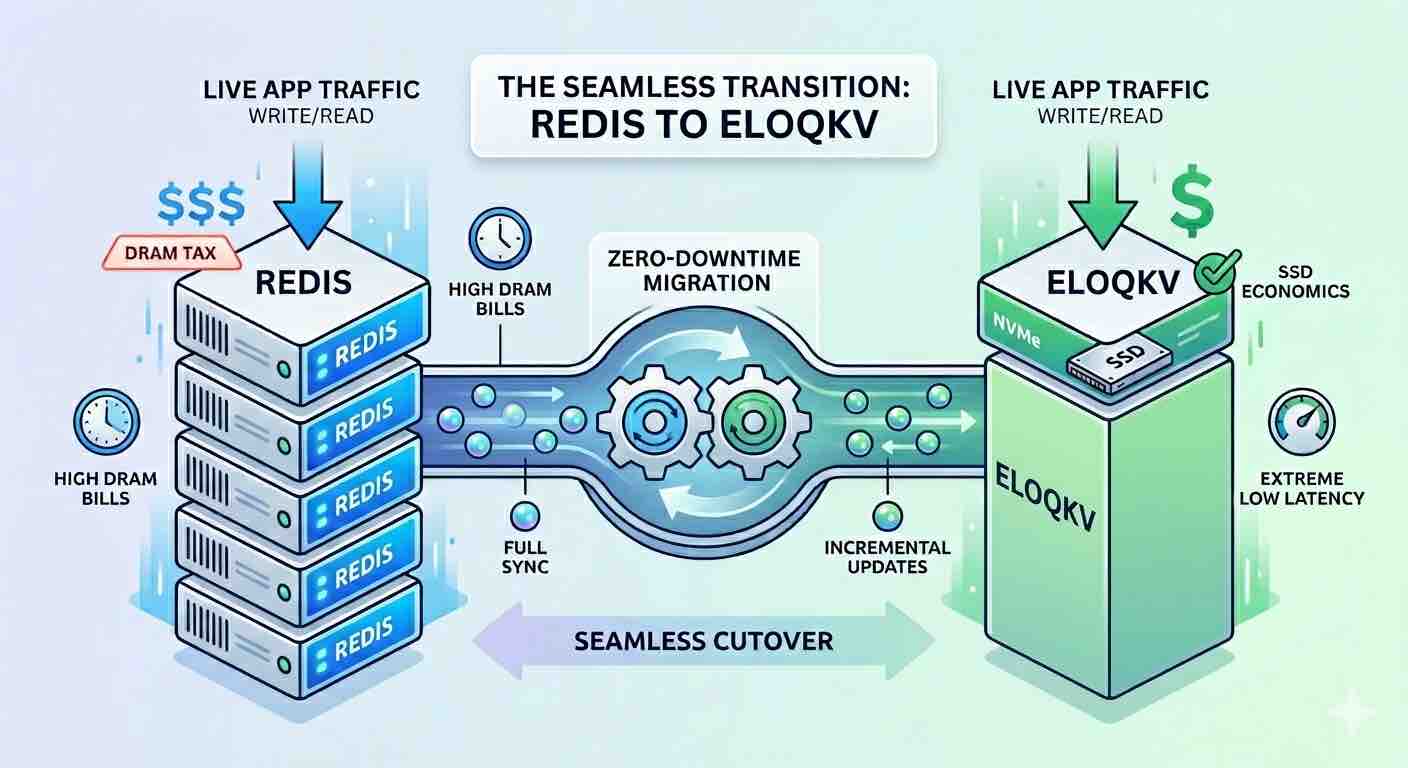
The Migration Driver: Escaping the "DRAM Tax"
For memory-bound use cases—such as a Feature Store for recommendation systems—the challenge isn't necessarily request volume, but the sheer footprint of user profiles and item embeddings. In a standard Redis setup, you are forced to pay for peak DRAM capacity, even if much of that data isn't accessed every second.
EloqKV breaks this linear cost curve. By utilizing a sophisticated storage engine optimized for NVMe SSDs, it delivers the speed of an in-memory database at the price point of disk storage. This migration doesn't just save money; it allows your business to scale its data footprint without a proportional increase in infrastructure spend.
The 3-Stage Migration Plan
To ensure a seamless transition with zero downtime, we use RedisShake, a versatile tool that treats EloqKV as a replica of your existing Redis cluster.
Stage 1: Full and Incremental Synchronization
The goal of Stage 1 is to mirror your Redis data onto EloqKV without affecting your production environment. RedisShake connects to your source Redis, performs a "Full" sync of the current dataset, and then switches to "Incremental" mode to ship every new write to EloqKV in real-time.
Configuration: shake.toml
To bridge the two systems, deploy RedisShake with the following configuration. This setup treats EloqKV as the target writer for all incoming Redis data.
[sync_reader]
cluster = false
address = "redis-production.example.com:6379"
password = "your_source_password"
tls = true
sync_rdb = true # set to false if you don't want to sync rdb
sync_aof = true # set to false if you don't want to sync aof

[redis_writer]
cluster = true
address = "eloqkv-cluster.example.com:6379"
password = "your_target_password"
tls = true
off_reply = false

[filter]
block_command = ["SELECT", "FLUSHALL", "FLUSHDB"]
block_command_group = ["STREAM","GEO","HYPERLOGLOG"]

[advanced]
dir             = "/data"
ncpu            = 1
status_port     = 8084
pprof_port      = 9094

log_file        = "/data/shake.log"
log_level       = "info"
log_interval    = 5
log_rotation    = true
log_max_size    = 512
log_max_age     = 7
log_max_backups = 3
log_compress    = true

rdb_restore_command_behavior  = "rewrite"
pipeline_count_limit          = 512
target_redis_max_qps          = 30000
empty_db_before_sync          = false

target_redis_oom_requeue = true
target_redis_oom_requeue_max_times = 3
target_redis_oom_requeue_delay_ms = 500

io_reconnect = true
io_reconnect_max_times = 100
io_reconnect_delay_ms = 10000

target_redis_writer_shards=4
target_redis_proto_max_bulk_len = 512_000_000
Stage 2: Diverting Read Traffic
Once the synchronization is stable and replication lag is minimal (usually measured in microseconds), you can begin utilizing EloqKV.
Because recommendation systems are heavily dependent on fast lookups, we switch the Read Traffic first. By pointing your application’s read clients to EloqKV, you can verify that the SSD-based architecture meets your latency requirements under real-world conditions.
Pro Tip: Monitor your p99 latencies during this stage. Most users find that EloqKV’s SSD performance is indistinguishable from Redis DRAM performance for feature lookups, but at a fraction of the cost.
Stage 3: The Final Cutover (Write Traffic)
With reads successfully validated on EloqKV, it is time to move the "Source of Truth."
- Stop Ingestion to Redis: Briefly halt your data pipelines or set the Redis source to read-only.
- Verify Buffer Flush: Ensure RedisShake has finished shipping the final set of incremental changes.
- Point Writes to EloqKV: Update your ingestion workers (e.g., Flink, Spark, or custom API workers) to write directly to the EloqKV endpoint.
- Decommission: Once the write path is stable, you can safely spin down the expensive, memory-bloated Redis instances.
Conclusion: Economics at Scale
By migrating your memory-bound Feature Store to EloqKV, you effectively decouple your data growth from your DRAM budget. You gain the ability to store 10x the features on the same budget, providing your recommendation models with more context and your business with a lower TCO (Total Cost of Ownership).
The transition is low-risk, the performance remains "extreme," and the SSD-based cost model finally makes large-scale data sets sustainable.